
Email setup
Your new email address is set up. If you are using Outlook it will set up another mailbox in your side panel.
Setup options:
The server settings required are but see below for automatic setup options.
- IMAP (in) server: caracal.mythic-beasts.com
- Port: 993
- Security: SSL/TLS (may also be labelled SSL)
- SMTP (out/send) Server: smtp-auth.mythic-beasts.com
- Port: 587
- Security: STARTTLS (or if not offered, try TLS or SSL)
1. If you are used to web-based email (yahoo, gmail etc, accessed online in a web browser) then Webmail may be your best option - go to https://webmail.vcsnet.co.uk/ and log in.
2. If you use iOS (Apple devices - ipad, iphone, Mac etc) AND the Apple Mail program you can request a QR code to scan which will set it up for you.
3. If you use a Windows or Android email client (i.e. a laptop program and/or App on your phone) then follow the set up procedure – choose Manual settings where possible.
If necessary, if Microsoft fails, enter the Server settings given at the start of this email.
A reasonably common issue is Microsoft can change the port automatically from what you put in, after you choose the security – look back and set it correctly!
And you MUST select/deselect these options in some versions:
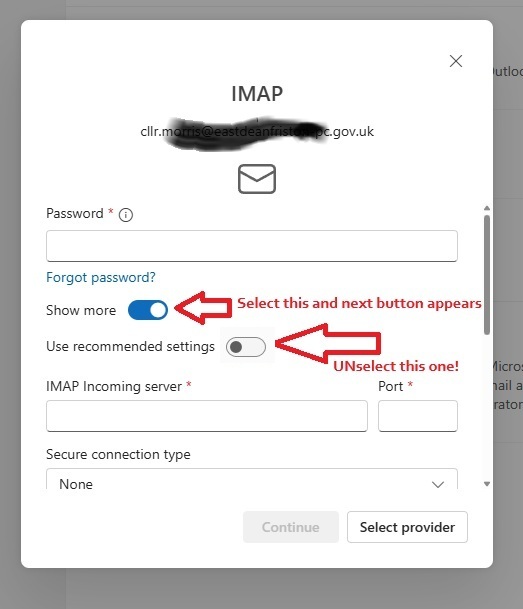
On occasions with some versions of Outlook it will fail even when you put everythign in correctly – just go back in and set it all a second time and it will work. This is a Microsoft issue not us.
Whichever method you choose, if you have any issues just email Support and tell us what type of device you are trying to set up and what email client/method/app you use to read email, and details of the issue you are experiencing.